A new way to review AI slides.
 Pintura
is free, open source, and coming soon.
Pintura
is free, open source, and coming soon.
Works with any AI agent, compatible with PowerPoint.
Works inside the apps you already use.
Opens inside Claude, Codex, or in a browser next to any terminal agent.
Address the comment on the revenue slide
I’ll read your comment in Pintura and update the slide.
Read comments.yaml
Edited revenue-multiples.yaml +1 −1
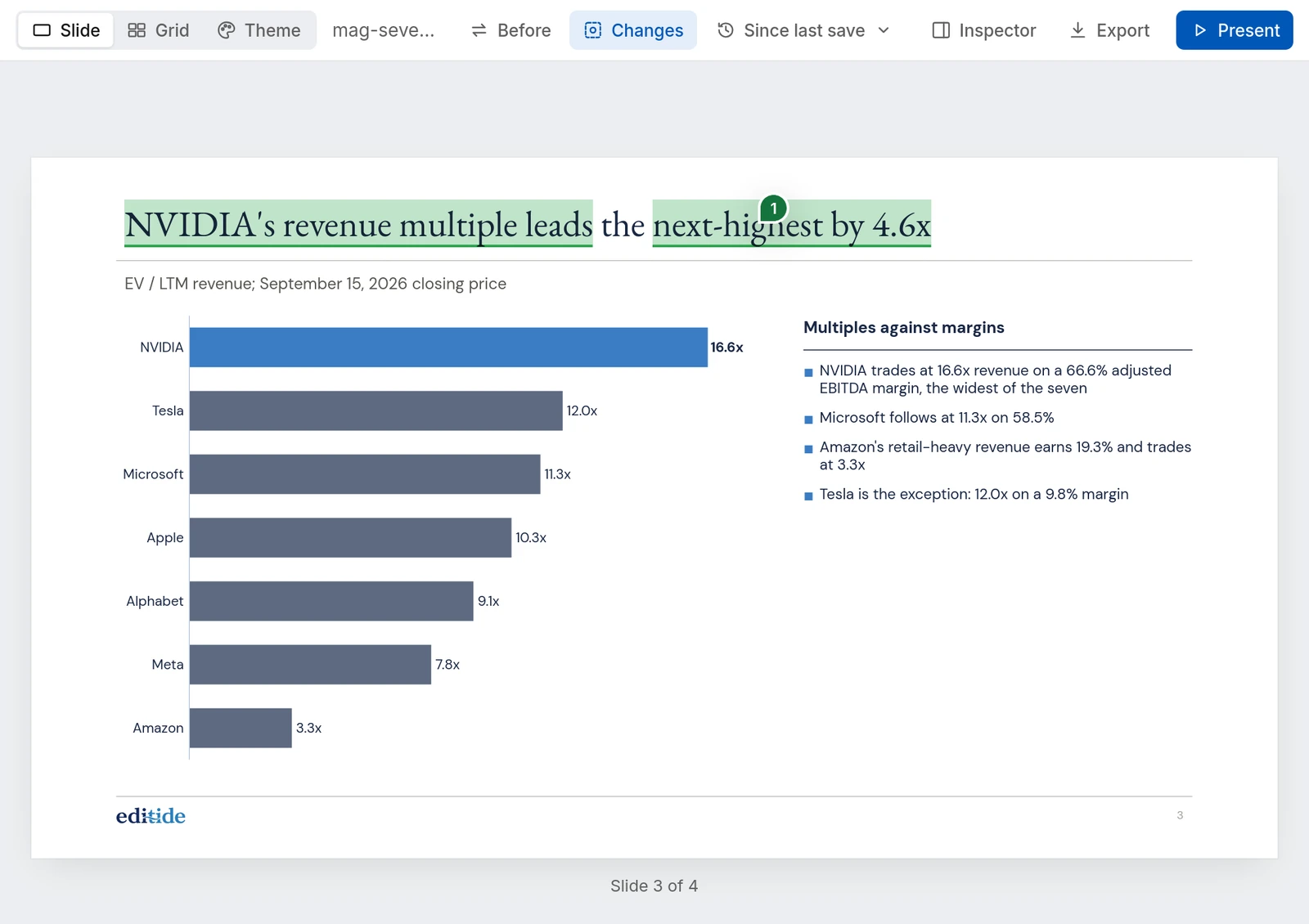
Done. The title now says NVIDIA’s multiple leads the next-highest by 4.6x, and the comment is marked done for you to check.
Address the comment on the revenue slide
Ran pintura deck --comments
Edited revenue-multiples.yaml +1 −1
The title now says NVIDIA’s multiple leads the next-highest by 4.6x. I marked the comment done so you can check it in the preview.
cwd: ~/decks
> Address the comment on the revenue slide
● Bash(pintura mag-seven/deck)
Preview at http://localhost:5180
● Read(mag-seven/deck/comments.yaml)
Read 16 lines
● Update(mag-seven/deck/slides/revenue-multiples.yaml)
Updated with 1 addition and 1 removal
2- title: NVIDIA carries the highest revenue multiple
2+ title: NVIDIA's revenue multiple leads the next-highest by 4.6x
● Done. The title states the 4.6x lead, and the comment is marked done for you to check.
? for shortcuts
 editide | mag-seven-comps
-
 comps.pptx
Start from your deck
Import an existing PowerPoint presentation, or start from scratch.
-
Review and iterate
Mark up the presentation, the agent edits, you see exactly what changed.
-
comps.pptx
Hand back a PowerPoint file
A native, editable deck your team or client can continue working on.
A new way to work.
Audit every figure: see how it was calculated, the inputs it used, and the original sources.
Pin feedback where it belongs. Your agent reads the comments and works through them.
Point Claude or Codex at the comments and let it work. Subagents can work in parallel.
Every word and number the agent touched is highlighted. Flip back to see the slide as it was.
Every save is kept. Pick one to see everything that changed since, or the slide as it stood.
Drag, resize, or reword right on the slide. For when it's faster to do it yourself.
In from PowerPoint. Out to PowerPoint.
Import your decks. Export files anyone can edit.
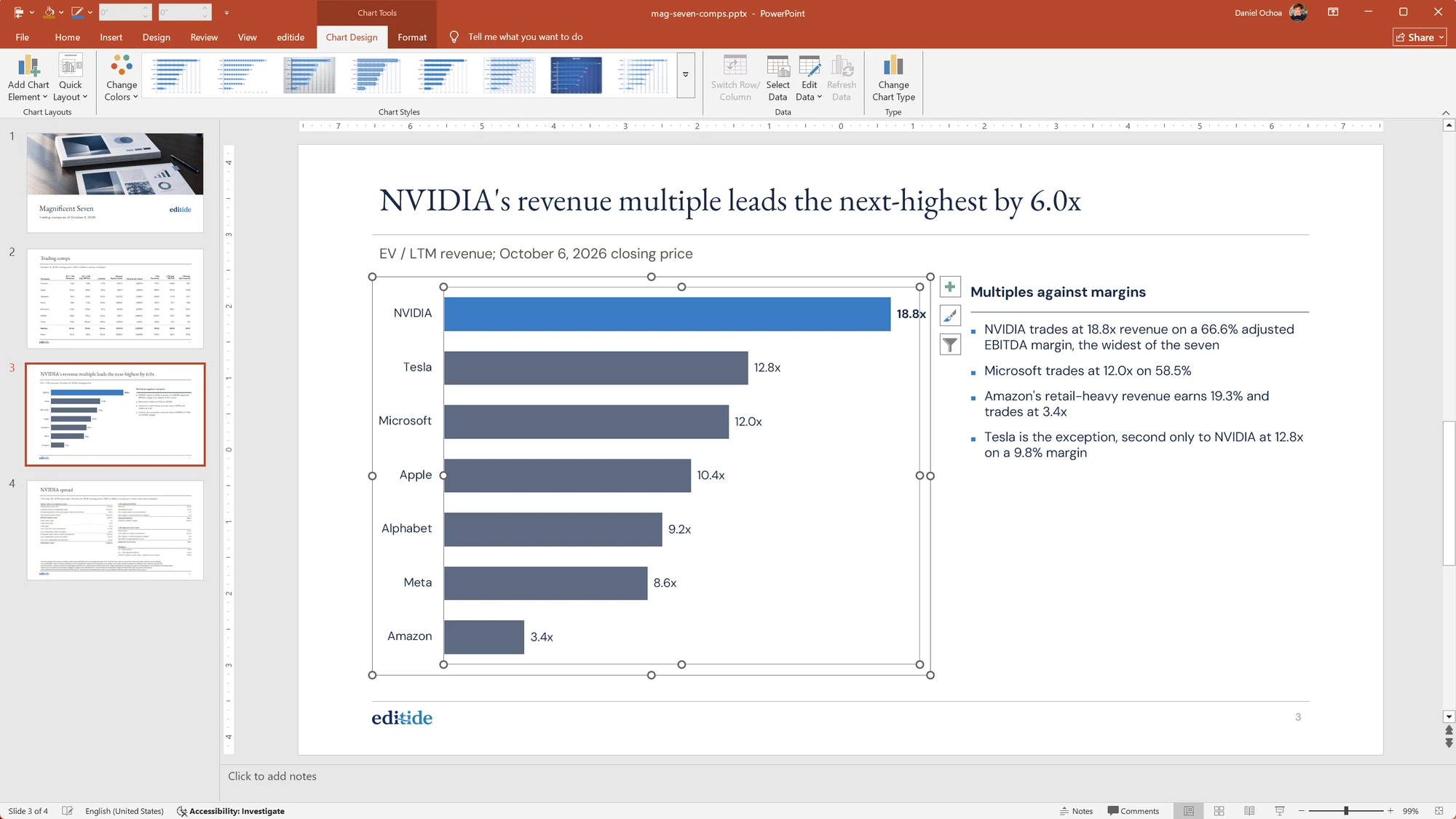
Built on editide’s PowerPoint engine, so nothing gets flattened.
| Object | Pintura with editide | Typical AI slide export |
|---|---|---|
| Charts | A PowerPoint chart with its data | A picture, or a pile of shapes |
| Colors | Linked to the theme | Hard-coded, so a new theme changes nothing |
| Fonts | Theme fonts at the sizes you set | Named fonts at sizes like 11.7 pt |
| Slides | Built on your layouts and masters | Blank slides with floating boxes |
Free and open source
Pintura runs on your machine and costs nothing.
Only PowerPoint import and export require an editide account.
Open source, forever
- Live preview in a browser
- Number tracing, comments, and change highlights
- Drag, resize, and reword on the slide
- PDF and HTML export
- Windows, macOS, and Linux
With an editide account
- Import existing decks with their layouts, masters, and theme
- Export native, editable .pptx files
- Paid plans for teams that export often
Pintura
Stand behind every slide.
Pintura is almost ready. Leave your email and you'll be the first to know.
Get notified